
Commit graph
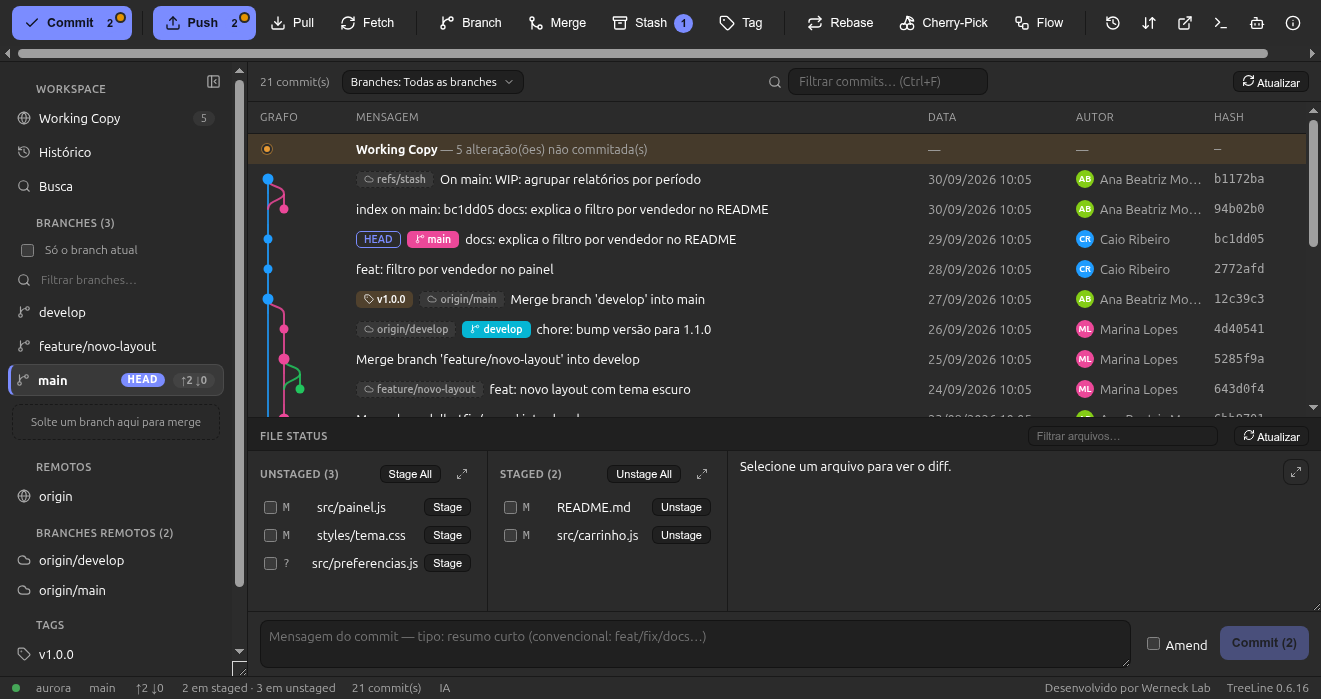
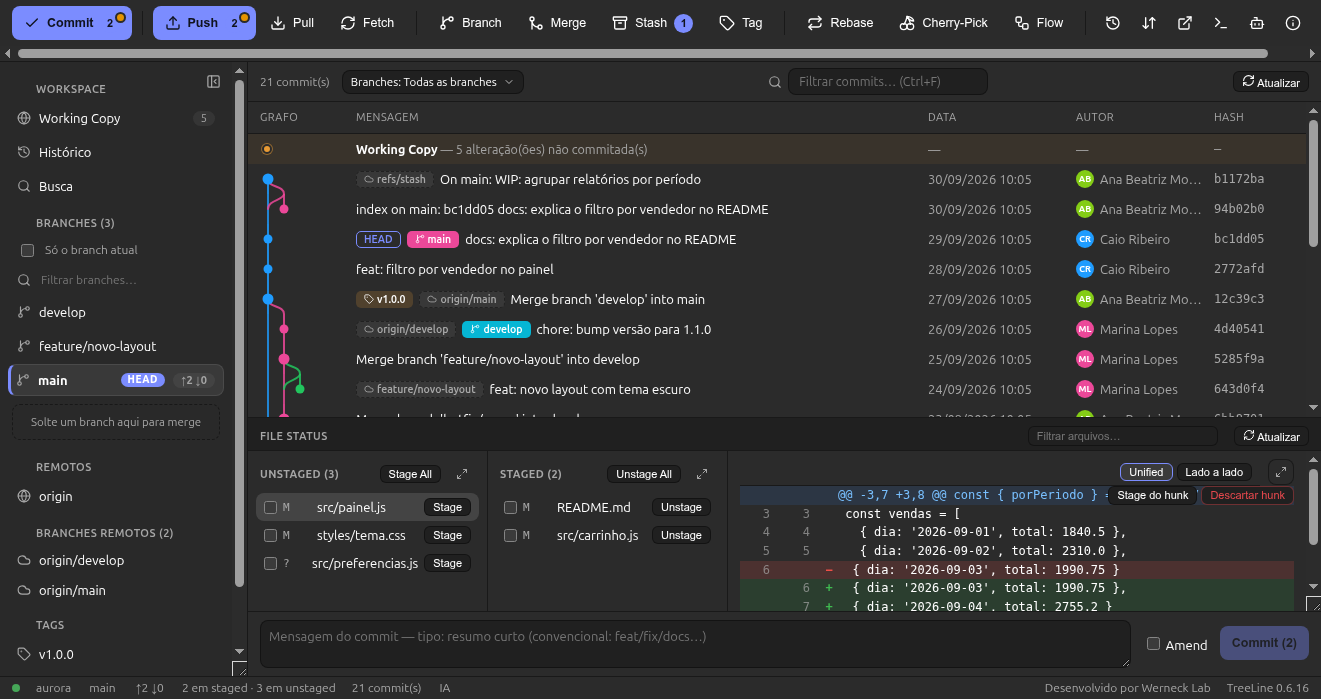
Colored lanes, merge curves, ref-type badges, dates and avatars. Branch combo with search, and compare between two commits (Ctrl+click).
Free and open source · MIT
TreeLine is a visual Git client for Ubuntu/Debian — a complete Git GUI for anyone coming from a classic interface to feel at home: the same toolbar, the same names, the same way of doing commit, branch and merge — with nothing to relearn.
Same button order, same English names, same states. What changes is the price and the platform.
| If you used a classic Git GUI (Windows/Mac) | In TreeLine you get |
|---|---|
| Toolbar Commit · Push · Pull · Fetch · Branch · Merge · Stash · Tag | Same order and names, with our own icons |
| Sidebar with bookmarks, branches, remotes and stashes | The same, with per-branch ahead/behind badges |
| Graph + File Status + diff | Colorful graph, stage by file/hunk/line and side-by-side diff |
| Credentials and SSH | Reuses the system's credential helper and ssh-agent |
TreeLine is an independent project, not affiliated with any other software vendor.
From the first commit to interactive rebase — without opening the terminal, but with the terminal one click away.
Colored lanes, merge curves, ref-type badges, dates and avatars. Branch combo with search, and compare between two commits (Ctrl+click).
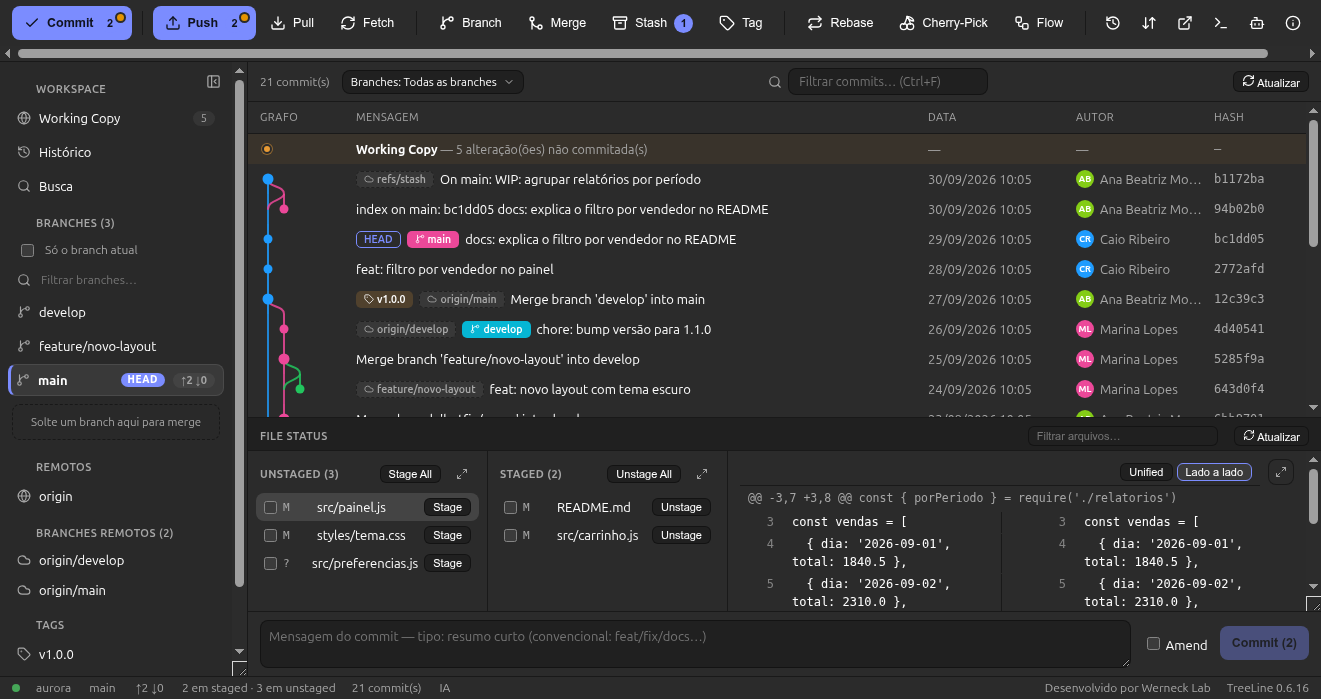
Pick exactly what goes into the commit. Side-by-side diff with per-block arrows, file filter and batch multi-select.
Commit (with Amend), Push (--force-with-lease when requested), Pull --ff-only and Fetch with a progress toast.
Create/rename/delete, merge with preview and --no-ff, simple and interactive rebase (pick/squash/reword), revert, reset and Git-flow.
Columns A | Result | B in the WinMerge style, with CodeMirror editors, one-click per-region choice and optional rerere.
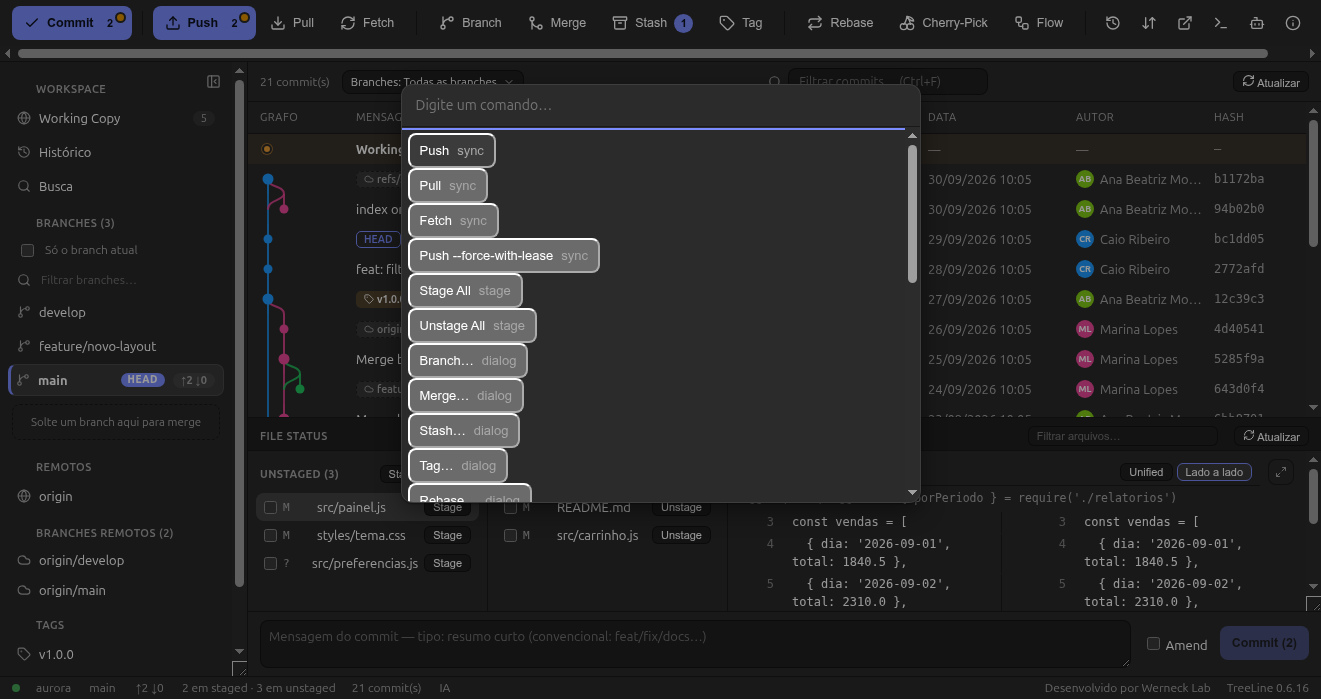
Ctrl+K for everything, collapsible sidebar (Ctrl+B), code search across all branches (Ctrl+Shift+F) and remappable shortcuts.
Hard reset, rebase and discard ask for confirmation and write a git bundle backup before running. Reflog + Undo included.
5 light, 5 dark, 2 high contrast and System. Author identity, credentials (libsecret/cache) and assistant configuration.
A drawer with a real shell in the repo folder, expandable and with pop-out. Ideal for hooks, LFS and git-flow when you want the CLI.
Real app screenshots, taken from the user manual.
Every commit with its lane, branch/tag/HEAD badges, search and per-branch filter. Click a commit to see metadata, files and diff.
+additions −deletions per file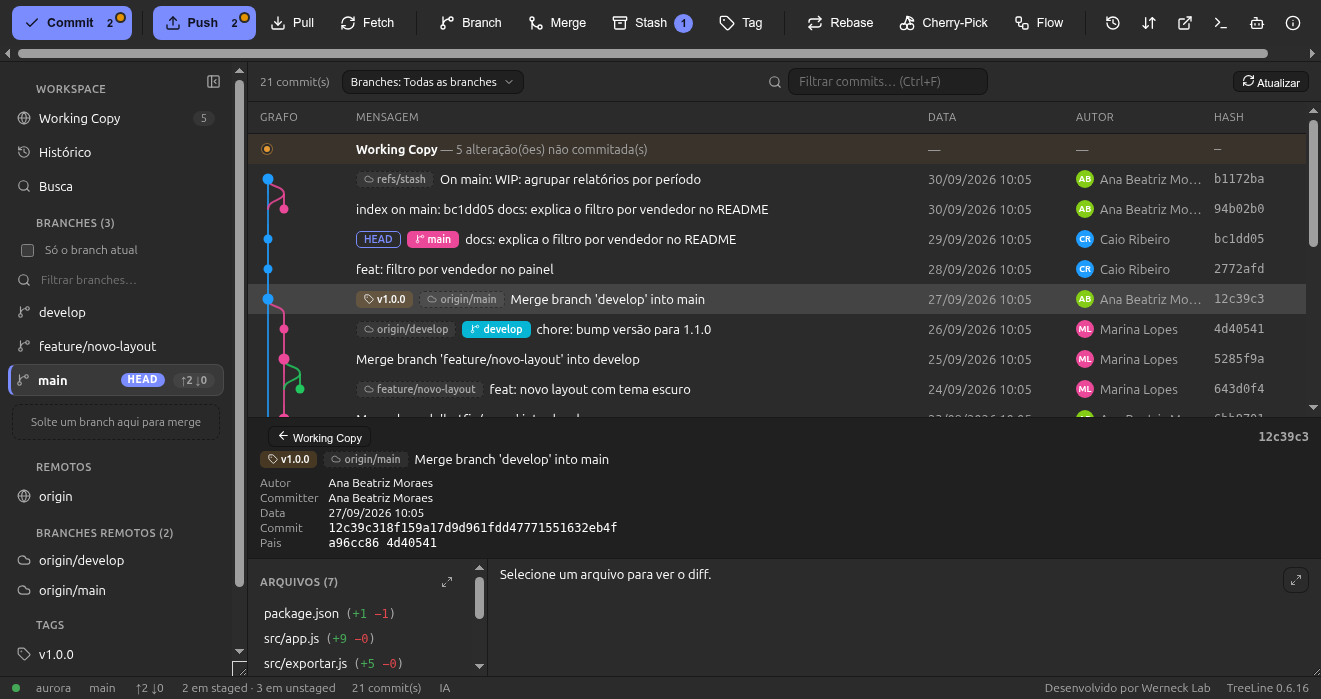
Prepare the commit exactly the way you want: by file, by block or by line. In side-by-side mode, the arrow moves the block between unstaged and staged.
The 3-way resolver shows A, Result and B on the same screen. Pick a side for each region, edit the result and finish the merge, rebase or cherry-pick.
--skip)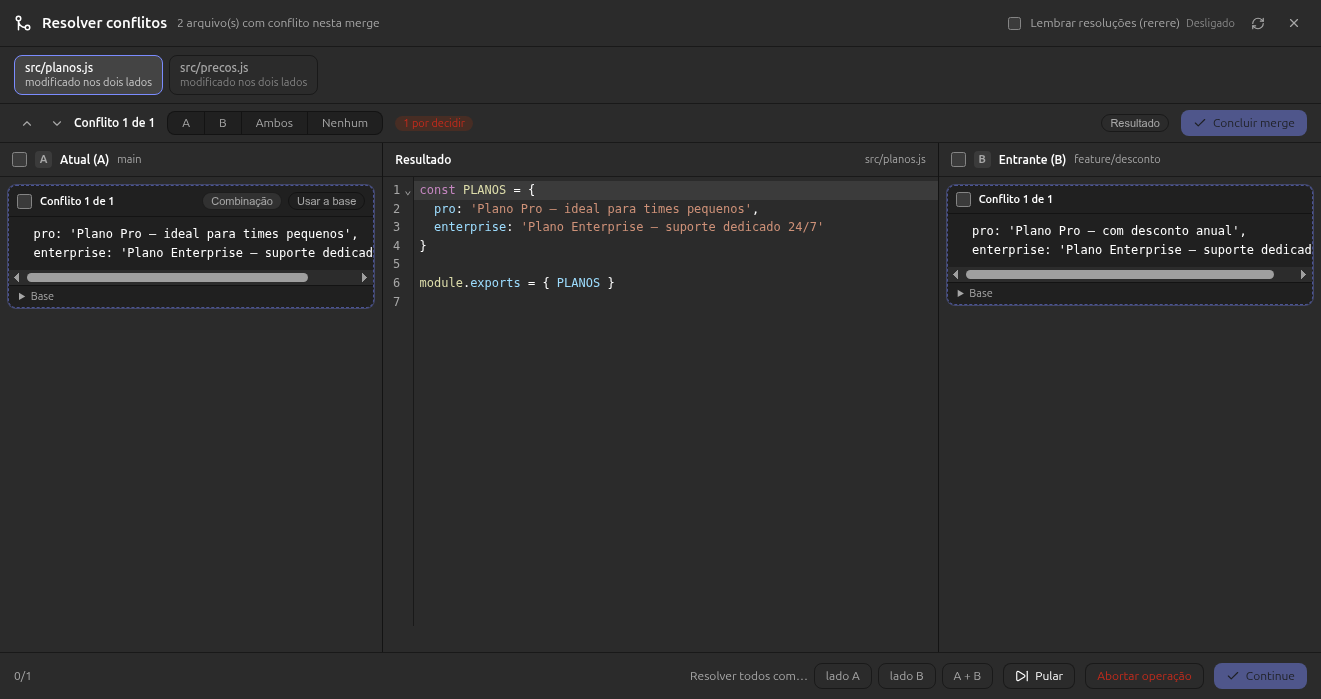
Your code and credentials never leave your machine.
No data is collected by default. No account, no login, no cloud.
Reuses credential.helper, keyring and ssh-agent. Never in plain text in the app.
Everything goes through your system's git — hooks, LFS and flow work just like in the terminal.
Reset, rebase and discard create a git bundle so you can undo without losing work.
Download straight from the GitHub release and install with apt.
.deb or the AppImageOn the GitHub Releases page you'll find the .deb package (Ubuntu/Debian) and the portable AppImage.
sudo apt install ./treeline-git-gui_0.6.16_amd64.deb
Prefer the AppImage? Download it, make it executable and run:
chmod +x TreeLine-0.6.16.AppImage && ./TreeLine-0.6.16.AppImage
treeline-git-guiRequirement: git ≥ 2.40. Optional: git-lfs and git-flow.
Yes — it's an independent alternative with a similar flow. Classic Git GUIs (Windows/Mac) have no official Linux version. TreeLine doesn't copy any brand, icons or copy: everything is original.
Ubuntu/Debian first (.deb + AppImage). Flatpak and other distros are on the roadmap.
No. No telemetry by default, and credentials stay in your system's helper.
Yes: TreeLine uses your system's git (≥ 2.40). This keeps hooks, LFS and flow behaving exactly like in the terminal.
No. It's open source under the MIT license — use, modify and distribute it while keeping the credits (WerneckLab).
TreeLine is a Git GUI for Linux — a graphical interface for Git designed for Ubuntu and Debian. It covers the versioning cycle without forcing you to memorize commands: clone and open repositories, review the commit graph, stage changes by file, hunk or line, compare diffs side by side, create and merge branches, and do rebase, stash, tags and git-flow.
If you're looking for a graphical interface for Git on Linux after years on a classic Git GUI on Windows or Mac, the learning curve is minimal: the same toolbar, the same button names, the same file states. And if you like the command line, there's a built-in terminal and a command palette.
The download is free (MIT license) and the code is open. To install, get the .deb (Ubuntu/Debian) or the portable AppImage. Requirement: git ≥ 2.40; optionally git-lfs and git-flow.
Download TreeLine and make your first commit in minutes.